
Attendance Tracking
Guide to viewing your personal attendance records
Attendance Tracking
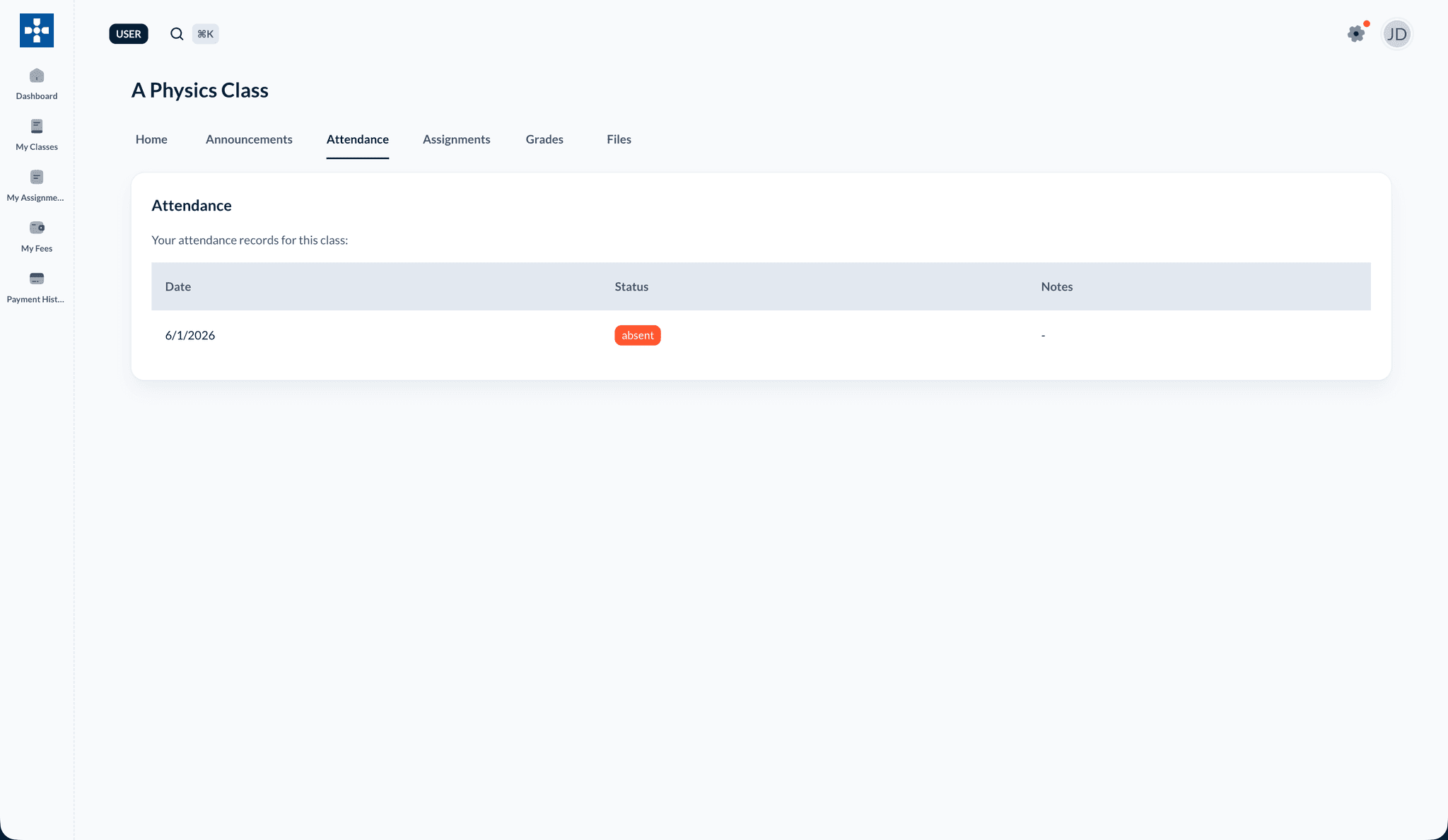
The Attendance Tracking section allows you to view your personal attendance records, check attendance statistics, and monitor your attendance patterns across all your classes.
Overview
Attendance Tracking enables you to:
- View your attendance for all classes
- Check attendance statistics and percentages
- See attendance history over time
- Monitor attendance patterns
- Identify days you were absent or late
- Track attendance by class
Accessing Your Attendance
Viewing Attendance Overview
- Log in to the student dashboard
- Click on "My Attendance" or "Attendance" in the navigation menu
- View your attendance overview
Attendance Summary
The overview displays:
- Overall Attendance Rate: Your total attendance percentage
- Total Days Present: Number of days attended
- Total Days Absent: Number of absences
- Total Days Late: Number of late arrivals
- Class-wise Breakdown: Attendance for each class
Viewing Attendance by Class
Class Attendance View
- Select a class from the dropdown or class list
- View attendance specific to that class
Class Attendance Details
For each class, you can see:
- Class Attendance Rate: Percentage for this class
- Days Present: Days attended in this class
- Days Absent: Absences in this class
- Days Late: Late arrivals in this class
- Attendance Trend: Pattern over time
Viewing Attendance History
Daily Attendance View
- Navigate to "History" or "Daily View"
- See attendance day by day
- View status for each day:
- Present: You were in class
- Absent: You were not present
- Late: You arrived after class started
Monthly Attendance View
- Select a month from the calendar
- View attendance for that month
- See pattern of attendance
- Identify days with issues
Calendar View
- Navigate to "Calendar" view (if available)
- See attendance displayed on a calendar
- Visual representation of attendance patterns
- Easy identification of absences
Understanding Attendance Status
Attendance Statuses
Your attendance can be marked as:
- Present: You attended the full class
- Absent: You were not present
- Late: You arrived after class started
Status Indicators
Visual indicators help you understand:
- Green: Present days
- Red: Absent days
- Yellow/Orange: Late days
- Gray: Days not yet marked or future dates
Attendance Statistics
Overall Statistics
View comprehensive statistics:
- Attendance Percentage: Overall attendance rate
- Perfect Attendance Days: Consecutive days present
- Absence Patterns: Frequency of absences
- Late Patterns: Frequency of late arrivals
Trend Analysis
View attendance trends:
- Improving: Attendance getting better
- Declining: Attendance getting worse
- Consistent: Steady attendance pattern
- Irregular: Inconsistent attendance
Filtering Attendance Data
Filter by Date Range
- Select start and end dates
- View attendance for specific period
- Analyze attendance for that timeframe
Filter by Class
- Select a specific class
- View attendance only for that class
- Compare attendance across classes
Filter by Status
Filter to see:
- All: All attendance records
- Present Only: Days you were present
- Absent Only: Days you were absent
- Late Only: Days you were late
Attendance Reports
Generating Attendance Report
- Apply desired filters
- Click "Generate Report" (if available)
- Create a report of your attendance
- Download or print if needed
Best Practices
Troubleshooting
Issue: Attendance not appearing
- Solution: Attendance is marked by teachers. If attendance isn't showing, your teacher may not have marked it yet for those dates.
Issue: Incorrect attendance status
- Solution: Contact your teacher if you believe your attendance was marked incorrectly. Teachers can correct attendance records.
Issue: Cannot view attendance history
- Solution: Historical data may be limited. Check date range and ensure you're viewing the correct period.
Issue: Attendance percentage seems wrong
- Solution: Verify the calculation period. Percentages are calculated based on marked attendance days.
Related Topics
- Viewing Grades - See how attendance may affect grades
- Profile Management - Manage your account
- Viewing Assignments - Stay on top of assignments